https://docs.google.com/presentation/d/1os2mp_YQ4r4Cl07xfsqa04CGrdNrhDUl/edit?usp=sharing&ouid=110438426383198798957&rtpof=true&sd=true
https://docs.google.com/presentation/d/1os2mp_YQ4r4Cl07xfsqa04CGrdNrhDUl/edit?usp=sharing&ouid=110438426383198798957&rtpof=true&sd=true


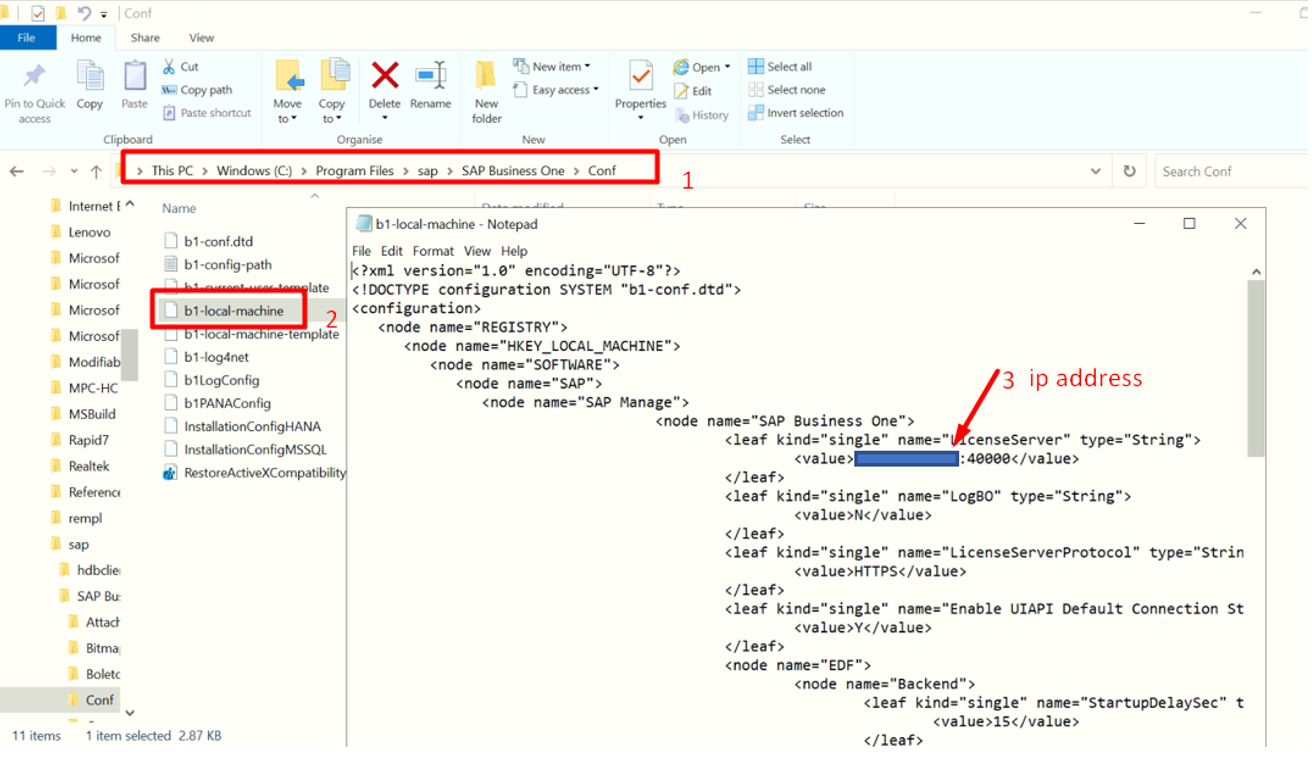
If certificate issues need to do the following:
1. Delete existing certificate in
Control Panel > Internet Option - under certificates tab
If there is
no existing certificate, you can just ignore this one. If there is existing
certificate you can delete it.
2. Turnoff Anti-Virus / Firewall
3. Go to C:\Users\USERNAME\AppData
> Go to Local & Roaming and delete the SAP folder
4. Edit the Conf file based on
screenshot and change the localhost same as SLD (IP Address of the Server)
5. Right click the SAP and run as
Administrator
Error:

try to run the the installation using the below command
./hdblcm --action=install --hdbinst_server_import_content=off
or
./hdblcmgui --action=install --hdbinst_server_import_content=off

Symptom
When installing SAP HANA Database 2.0 SP04 on SUSE 15 SP01, the installer fails with the error message:
Installation of SAP HANA Database System failed.
INFO: Summary of critical errors
ERR : Installation of SAP HANA Database System failed.
ERR : Installation of SAP HANA Database failed
INFO: Installation failed
INFO: error installing
INFO: Cannot create system
INFO: installsapinit.sh FAILED
INFO: Starting external program <PATH>/hana/shared/H09/global/hdb/saphostagent_setup/installsapinit.sh
INFO: Command line is: <PATH>hana/shared/H09/global/hdb/saphostagent_setup/installsapinit.sh
INFO: Output line 1: /sbin/insserv: No such file or directory
SAP HANA PLATFORM EDITION 2.0
The reason for this error is because the VM is missing the following insserv-compat package.
To solve this issue, execute this command: zypper install insserv

